
Build the Job on the Computer
By Luke Williams · September 15, 2026
Why the Model Comes Before the Machine
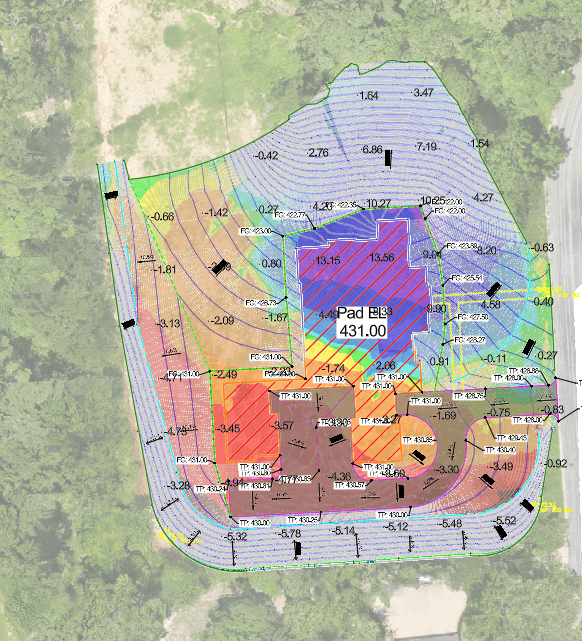
"Build the job on the computer." That's the phrase that stuck with a contractor we sat down with recently. His crews were about to mobilize on a pad site with a grading plan that looked clean on paper. It wasn't. The job would have shipped water straight at the building.
The Old Way: Show Up and Figure It Out
For a long time, crews evaluated sites in person and estimated scope off experience and a set of stamped plans nobody double-checked. Unforeseen conditions got solved mid-project, on the clock, with the dozer already running. Work got done. But contractors doing it this way are leaving production on the table, because the job was never modeled before the first cut.
0–80%
Rework reduction from grading errors caught before mobilization
0–40%
Reduction in over-excavation when the job is modeled first
0–50%
Productivity gain on rough grading with GPS machine control
The Power of the DTM
Civil Mesh builds a DTM, a Digital Triangulated Mesh, from the ground up. We capture the site by drone topo or GPS, build the mesh, and layer the design surface over it. That DTM is the file your machine control reads. It's also the source for every takeoff, audit, and as-built report that comes after. Running cut/fill against that model surfaces slope conflicts, material imbalances, and grading errors before a machine ever touches dirt, not after.
On a typical 50,000-cubic-yard job, a 10% reduction in material at $8 per yard works out to roughly $40,000 saved, before the first pass of equipment ever moves.
Risk Doesn't Scale Down
Skipping a model and topo on a smaller job to save a little time up front is like dropping insurance because you're only driving down the street. The risk to your schedule and your margin doesn't shrink with the job size. It's still there. Build the job on the computer first, every time, and let the field execute what's already been solved.
Sources: Machine control productivity, over-excavation, and rework figures from Projul's construction GPS machine control guide, 2025. The material savings example is illustrative industry math, not a client-specific result.
Frequently Asked Questions
What does "build the job on the computer" actually mean?
It means creating a DTM, a Digital Triangulated Mesh, of the site before any equipment mobilizes. The mesh is built from a drone topo or GPS survey, then layered with the design surface, so slope conflicts, material imbalances, and grading errors get caught and solved on screen instead of in the field.
What's the difference between a DTM and a regular survey?
A topo survey captures existing ground conditions at a point in time. A DTM goes further: it's a 3D mesh built from those points that machine control equipment reads directly, and that every takeoff, audit, and as-built report is derived from. The topo is an input. The DTM is the working model.
Is this only worth it for large or complex jobs?
No. The operational risk on a smaller job doesn't shrink just because the site is smaller. Skipping the model to save time up front just moves that risk into the field, where it costs more to fix. The model-first approach scales down as reliably as it scales up.
What does a DTM catch that a stamped grading plan might miss?
Grading plans get produced by people and software, and both make mistakes: reverse drainage, material imbalances, slope conflicts that only show up once the DTM is checked against real ground. Running the model first turns those into a desk fix instead of a field problem.
How does the DTM connect to the rest of the job?
It's the single source everything else pulls from. The same mesh drives the machine control model in the cab, the cut/fill takeoff used to bid the job, and the as-built report at closeout. One file, no translation, no version drift between what was designed and what got built.